How I used Sanity CMS to Spin Up a Blog for my Brother
Published on 2025-10-15
Written by: Shannon McKinney
My brother needed a blog so I made him one using Astro with a Sanity CMS and it worked better than I could've expected
My current setup for my blog posts is here on github. I have my blog in my IDE: VSCode, and I write in Markdown for each post. I use astro as my web framework and started from their blog template. The setup was pretty easy and the tutorial was thorough enough for me to get started writing blog posts! I, unlike my brother, code for a living, am used to git, and have a coding setup already on my computer. So, when he came to me and asked for a blog too, I knew I had to figure out a different solution.
Plan A
My first idea was to keep the same setup as I have now, and just do the coding for him. I would handle all the configuring for his homepage and whatever he wanted to show on his “About Me” section. He would be in charge of the content of the blog posts. This would mean he would have to learn Markdown, but I had confidence that with a cheat sheet, he would be able to write with relative ease.
The slightly overlooked aspect of this plan was that he would need to install an IDE and push and pull commits from my git repo. Here I was less confident in his ability since I knew we would both be working on the same project and was afraid of him having access to all of my code. This also introduces some lag in when he writes a post and when it gets published if I had him work on a branch and me merge his changes.
This solution was feasible but I knew I could do better.
Introducing CMS
A CMS (Content Management System) is a way you can separate the role of “coder” and “content designer”. A CMS provides a nice UI for the content designer that the coder’s backend code pulls from so you can have updated content on your webpage without having to make a commit in the repo. The UI has customizable fields so I can ask my brother for a title, make it mandatory, then ask for a description, ask for an optional picture, and then boom! My blog post template takes care of the rest!
My chosen prebuilt CMS was Sanity Studio. Reddit told me it was the best so I never looked back. Luckily for me, sanity had an Astro + Sanity blog template!. All I had to do was follow the instructions and I had a basic blog site with a “studio” which acted as the UI for my brother. This worked GREAT locally. I was able to spin up the studio and the blog page, and make changes appear instantaneously. The problem came when I went to deploy this to my Cloudflare pages.
Static or Dynamic?
There is a little more added complexity with using a CMS. Up until now, my blog website has been static, with each new post needing a commit in my repo that would set off another build in my hosting provider Cloudflare. Astro is built for simple, light-weight, static sites and it does that really well. I was going to need to change this to be dynamic or hybrid to allow for constant POST requests to the CMS so the content on the site is always updated.
Sanity has some setup for Vercel hosting that would’ve handled this but I was already hosting in Cloudflare and didn’t want to change. My plan was to implement On-demand rendering using server adapters. I just had to install @astrojs/cloudflare and change some imports from Vercel to Cloudflare. This seemed like it would work until I realized I didn’t want to mess with the complexity of server adapters and tried to think of a simpler way. I also wanted to keep my website static since it would be faster and easier to setup and change later.
Deploy Hooks and Webhooks
Luckily, I found a page about Cloudflare Deploy Hooks. This would allow me to set a hook so that every time there was a change in the Sanity Studio, it would trigger my deploy hook in Cloudflare and redeploy my application. No git required!
Sanity also supports this as Webhooks. All I had to do was create a webhook in Sanity and add it to my Cloudflare pages deploy hook and it just worked!
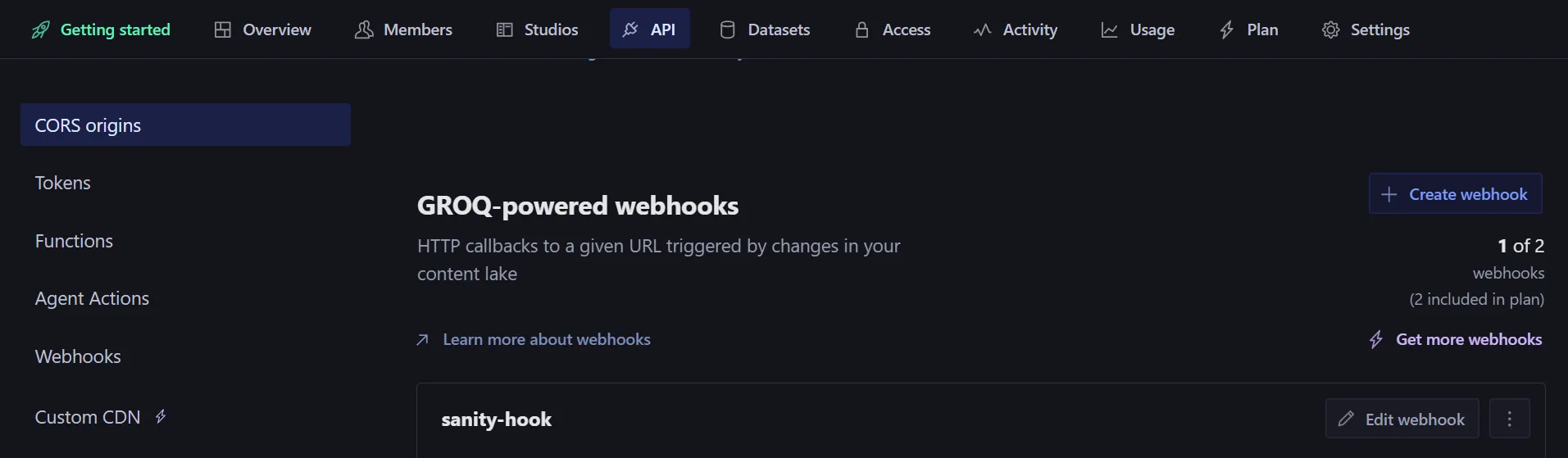
Here are the instructions I followed and I just substituted Nuxt.js for Astro. Instructions on connecting Sanity to Cloudflare
Final Verdict
Now I have an astro project in github that I can change around and play with while my brother focuses on the content he wants on his website without having to involve me every time he wants to publish something new. Cloudflare takes care of everything by automatically redeploying on every change in Sanity Studio.
The other thing I didn’t mention is that Sanity handles the hosting for the Studio part of your CMS. So the UI url I give to my brother to input his content, I don’t have to worry about hosting. It would probably be easy enough to host this myself, but if they’re offering, I’ll take it!
I think this solution was perfect for my use case: quick and dirty blog post CMS. But I can’t wait to expand on it more and graduate the site from template to unique place my brother can share his best work! Here is his blog if you want to check it out! The Life and Times of Some Guy.